
Customer and Driver Rating
Customer & Driver Ratings in TEQ
After each completed trip, TEQ automatically collects customer feedback to help you monitor service quality, identify improvement areas, and maintain high operational standards.
Customer Feedback
How Feedback Is Collected
After a successful trip:
- The main customer receives an email survey covering:
- Overall satisfaction with your company
- Trip quality
- Driver professionalism
- Onboard experience
- The contact person on the trip receives a text message survey, where they:
- Provide a 1-5 star rating
- Add optional comments about the trip
This provides both overall company feedback and insight into the real-time trip experience.
Viewing Customer Ratings
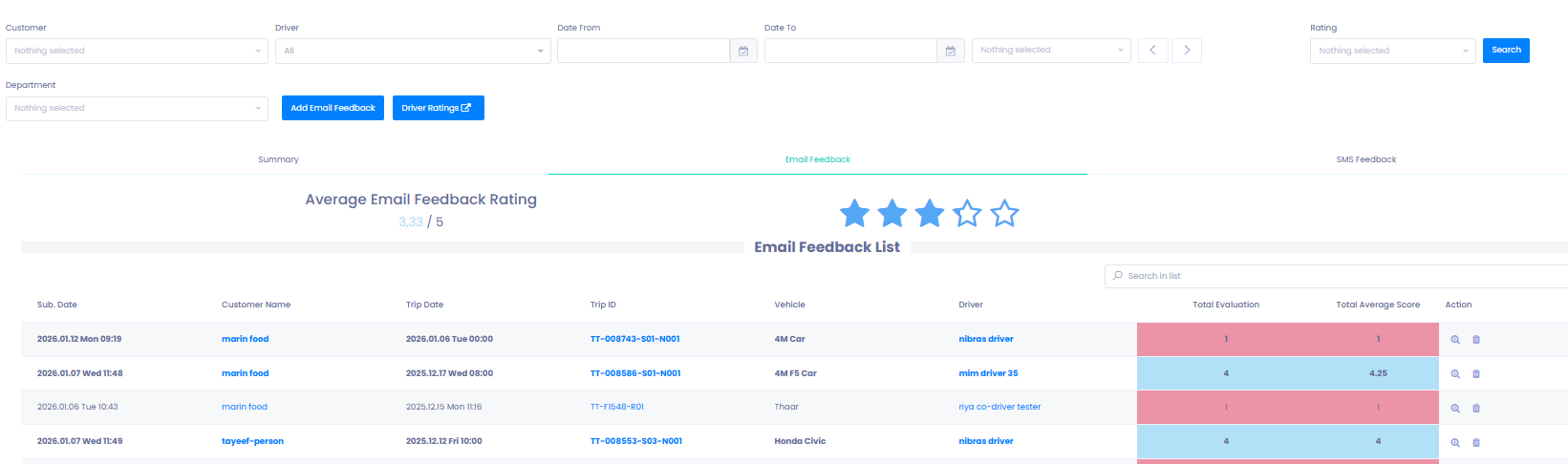
Step 1: Open Customer Rating
- Go to Quality → Customer Rating.
- Select the customer you want to review.
- Choose an assessment period.
- Click Search to load results.
Step 2: Review Feedback
You can view:
- ⭐ Overall summary
- ✉️ Email feedback
- 📱 SMS feedback
Each feedback entry includes:
- Rating (1-5 stars)
- Written comments
- Trip details
- Driver name
- Submission method
- Timestamp
Step 3: Add Feedback Manually (New Feature)
If you receive feedback outside of the automatic surveys (e.g., phone, in-person, email), you can manually add it:
- Click Add Feedback.
- A survey form appears - identical to what the customer receives.
- Fill in the rating and comment on their behalf.
- Submit to save it to the customer’s feedback history.
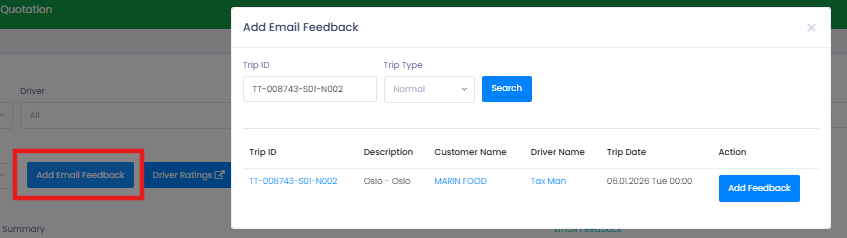
This ensures all customer sentiment is captured in one place, even if provided externally.
Driver Ratings
Driver ratings are pulled from the SMS surveys completed by the contact person on each trip.
Step 1: Open Driver Rating
- Go to Quality → Driver Rating.
- View a complete overview of each driver’s performance.

Step 2: Review Ratings
For each driver, you can see:
- ⭐ Average rating (1-5)
- 📊 Number of surveys returned
This helps you identify:
- High-performing drivers
- Drivers who may need feedback or coaching
- Trends across specific routes or customer groups
🛠 Troubleshooting
No ratings appearing for the selected period
- Expand the date range.
- Confirm that trips were completed and surveys were issued.
Customer or contact did not receive the survey
- Verify email and phone number on the customer card.
- Ask the customer to check spam or blocked SMS settings.
Driver rating missing for a trip
- Ensure the driver was assigned to the trip in TEQ.
- Confirm the contact person completed the SMS survey.
Manual feedback not saving
- Check required fields in the Add Feedback form.
- Refresh the page and retry.
Still having issues?
- Reach out to TEQ Support with screenshots and Trip IDs for faster assistance.